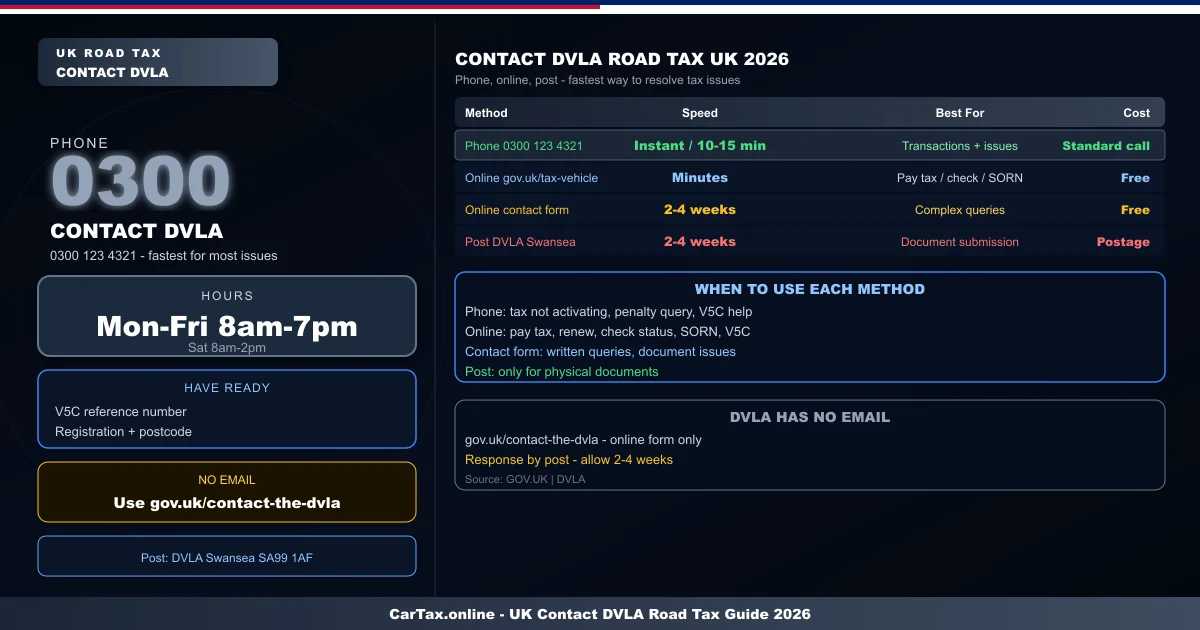
On 22 April 2026, thousands of UK drivers have questions about vehicle tax that need answers from DVLA. Whether it is a tax not activating after payment, a V5C that has not arrived, or a fine that seems wrong — knowing how to contact DVLA efficiently saves time and frustration. This guide covers all the ways to reach DVLA and which to use for each situation.
Phone: The Fastest Route for Most Issues
The DVLA vehicle tax phone line — 0300 123 4321 — is the fastest way to resolve most road tax enquiries. Open Monday to Friday 8am to 7pm and Saturday 8am to 2pm, the line handles tax transactions, SORN declarations, V5C issues, and penalty queries.
For tax transactions — paying road tax, renewing, or checking the status of an application — the phone service is as fast as the online service and is useful if you encounter issues with the online system. Calls cost the same as a standard landline — typically 2p to 8p per minute from most UK phone providers.
Before calling, gather: your V5C reference number, vehicle registration, and postcode. These are the three pieces of information DVLA uses to verify your identity. Having them ready dramatically speeds up the call.
Online: Best for Transactions and Self-Service
Most road tax tasks can be completed without contacting DVLA at all — the self-service options at gov.uk cover the vast majority of what drivers need:
- Tax a vehicle: gov.uk/tax-vehicle — available 24/7, immediate activation
- Check tax status: gov.uk/check-vehicle-tax — free, instant, any vehicle
- Declare SORN: gov.uk/sorn-vehicle — immediate, free
- V5C replacement: gov.uk/replace-vehicle-registration-certificate — form V62, £25 fee
- Notify DVLA of sale: gov.uk/sell-your-vehicle — immediate confirmation email
For issues that the self-service tools cannot resolve, the online contact form at gov.uk/contact-the-dvla allows you to raise specific problems — tax not activating, incorrect vehicle details, V5C not received, and similar issues. You will receive a response, typically by post.
Post: Use for Document Submissions
DVLA's postal address for vehicle licensing matters is: DVLA, Swansea, SA99 1AF. Use this address for:
- Submitting V5C section 8 (Notice of Sale) if the buyer has not completed online transfer
- Sending documents requested by DVLA in response to a written enquiry
- V5C applications by post (though online is faster)
Always use signed-for postage when sending documents to DVLA. Keep your reference number and proof of postage. Response times for postal enquiries are typically 2 to 4 weeks — phone or online is faster for any matter that can be resolved without physical documents.
Email: DVLA Does Not Use Email
DVLA does not offer a direct email address for vehicle enquiries. If you send an email to any DVLA address, you will receive an automated response directing you to use the phone or online services. There is no email route to DVLA that provides a response to specific vehicle queries.
The gov.uk/contact-the-dvla contact form is the closest thing to email — you submit a query online and receive a response by post. This is slower than phone but useful if you need to include specific information or screenshots of issues.
Social Media and Other Channels
DVLA has a social media presence on X (formerly Twitter) and Facebook, but these channels are not official routes for resolving specific vehicle queries. They are used for general information and signposting. Do not share personal vehicle information — registration number, V5C reference — on social media as this could be used for fraud.
The only secure and official channels are the ones above: phone, the DVLA website self-service tools, the online contact form, and post.
Common Road Tax Issues and the Right Channel
Tax not showing after online payment: Phone DVLA on 0300 123 4321 — they can check the transaction and activate the tax manually if needed.
V5C not received after purchase: If it has been more than 2 weeks since you applied, use the online contact form or phone DVLA to check the application status.
Incorrect vehicle details on tax confirmation: Use the online contact form or phone DVLA — incorrect details can be corrected but may require supporting documentation.
Road tax penalty notice received in error: If your vehicle was taxed but you received a penalty, phone DVLA immediately with your payment confirmation. Most errors can be resolved quickly with proof of payment.
V5C reference number lost: You can retrieve it by phone if you can verify your identity using your vehicle registration, postcode, and driving licence number.
Summary
Phone 0300 123 4321 for fastest resolution on most issues. Use gov.uk self-service tools for all standard transactions — tax payment, SORN, V5C replacement — available 24/7. Use post only for document submissions. There is no email route — use the gov.uk contact form instead. Have your V5C reference number and vehicle registration ready before calling.